Key takeaways
- MB SQL query submission limit, and mandatory column aliasing in SQL Transform tools.
Alteryx has expanded its data analytics integration with Google Cloud BigQuery by introducing in-warehouse processing for unstructured data workflows through Alteryx Live Query. The browser-based tool allows enterprise data and operations teams to automate document extraction, classification, and reconciliation directly within BigQuery using native SQL pushdown, eliminating the need to move sensitive raw files across external environments. By pairing visual pipeline authoring with Google’s Gemini foundation models and BigLake object tables, organizations can ingest invoice PDFs staged in Google Cloud Storage, extract structured metadata, and validate records against historical warehouse data while remaining under enterprise governance policies.
In-Warehouse Processing for Unstructured Documents
Enterprise finance and accounting departments handle massive volumes of incoming vendor invoices, typically delivered as PDF files with inconsistent formatting, missing header fields, and varying item structures. Historically, data teams relied on disconnected third-party optical character recognition (OCR) tools or specialized staging servers to extract invoice records before manually loading them into a data warehouse. This fragmented process created data egress risks, increased infrastructure costs, and made audit trails difficult to maintain across distributed environments.
According to announcement details shared by Google Cloud and Alteryx, Live Query addresses this friction by executing document processing pipelines directly inside the customer’s BigQuery instance. Transformation and reconciliation logic run natively via SQL pushdown rather than transferring datasets over public networks, ensuring that fine-grained access policies established in BigQuery remain intact throughout the document lifecycle.
Michael Wyant, Vice President of Enterprise Data and Corporate Solutions at Papa Johns, noted that Alteryx One: Google Edition provides business analysts with an intuitive interface to build governed workflows against BigQuery data without requiring low-level SQL coding. By anchoring data processing inside the warehouse, enterprise teams aim to achieve higher straight-through processing rates and surface accounting discrepancies earlier in reconciliation cycles.
Pipeline Architecture and Gemini Orchestration
The solution relies on a split operational architecture. Workflow design occurs visually within the browser via Alteryx Live Query, while Alteryx One Platform Services acts as a coordination layer managing execution planning and traceability. The underlying data storage, artificial intelligence inference, and validation logic reside entirely within the customer’s Google Cloud environment.
To process unstructured files without staging data externally, the pipeline leverages BigLake object tables over Google Cloud Storage. Object tables expose metadata such as file URIs, file sizes, and creation timestamps as structured relational records, enabling BigQuery SQL functions to interact directly with raw binary objects.
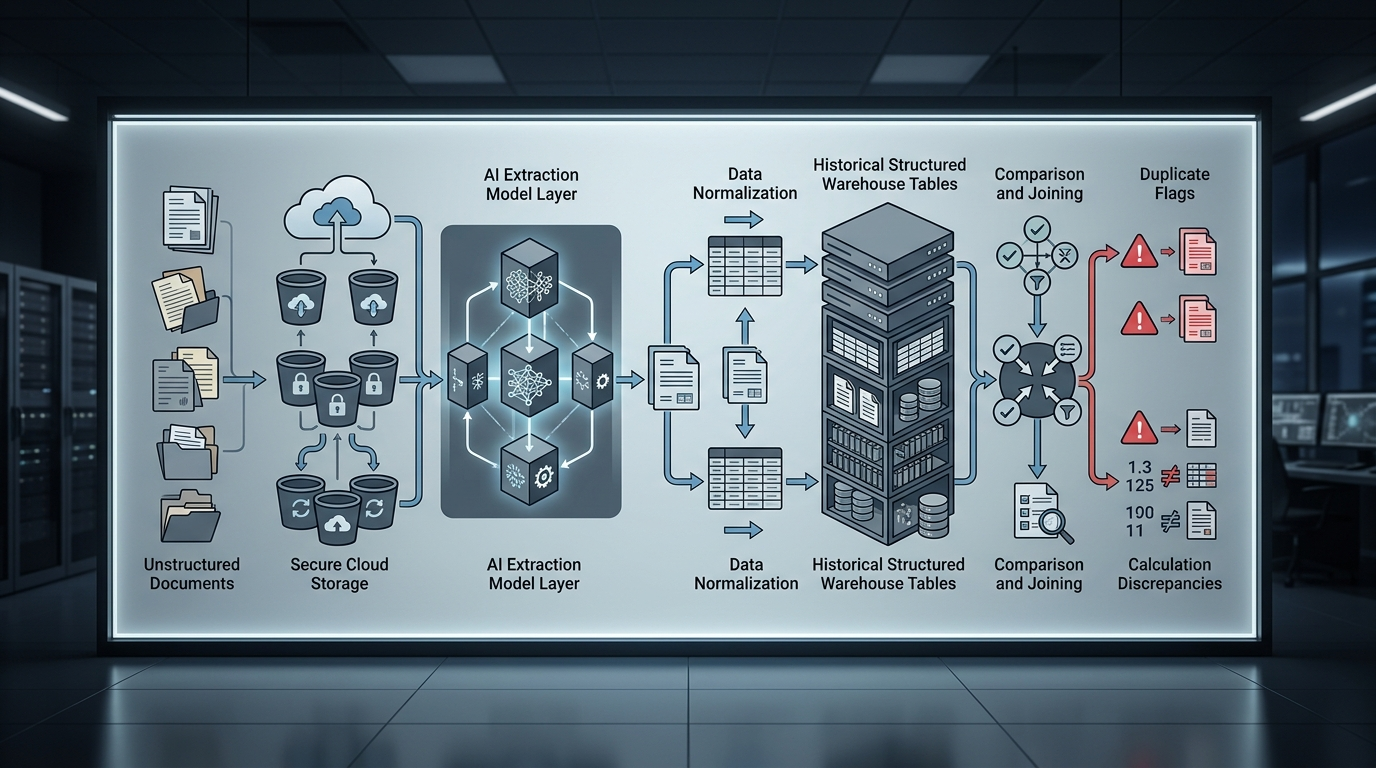
The document-to-decision pipeline operates through six distinct stages:
- Directory Ingestion: Live Query points to a designated Google Cloud Storage bucket, enumerating PDF paths and file metadata to establish the input dataset.
- Document Extraction: The Document Extract tool creates a temporary external object table and invokes the user-selected model. In the Gemini path, BigQuery executes the
AI.GENERATEfunction with structured prompts to extract invoice numbers, vendor names, line items, net totals, and tax amounts. Alternatively, workflows can route documents to Google Document AI usingML.PROCESS_DOCUMENT. - Zero-Shot Classification: The Classify tool applies the
AI.CLASSIFYfunction in BigQuery to assign extracted line-item descriptions into predefined procurement categories, such as industrial equipment or office supplies. - Data Normalization: Extracted fields undergo standardization steps to eliminate whitespace variations and formatting discrepancies before matching.
- Historical Reconciliation: The normalized records are joined against existing BigQuery invoice tables to flag duplicate invoice numbers already present in the warehouse.
- Exception Routing: Custom formula rules evaluate business logic, such as confirming whether net amounts plus tax equal the invoice total, before routing outputs into approved payment streams or human review queues.
Enterprise Readiness and Technical Constraints
Self-service cloud analytics remains a major operational challenge across enterprise IT. Industry survey data cited by Alteryx indicates that only 18% of organizations have achieved self-service cloud data access for business users. To widen access, Alteryx launched Alteryx One: Google Edition on Google Cloud Marketplace, incorporating native cloud connections for Google Sheets and Google Drive alongside BigQuery pushdown capabilities according to reporting from A-Team Insight.
However, enterprise architects must account for specific technical boundaries when deploying Live Query for BigQuery workloads. While the authoring environment provides interactive canvas previews using small sample subsets, full runtime executions are subject to warehouse quotas and configuration prerequisites.
| Component or Requirement | Implementation Detail | Architectural Impact |
|---|---|---|
| Base Storage Prerequisite | Google Cloud Storage configuration required | Alteryx workspaces must configure GCS as their base storage to enable in-place processing (Alteryx Documentation). |
| Query Submission Ceiling | 1 MB SQL payload limit | Native BigQuery pushdown queries cannot exceed 1 MB in total text size (Alteryx Limitations). |
| SQL Transform Formatting | Mandatory column aliases | Custom SQL expressions inside the SQL Transform tool require explicit column aliasing to prevent schema parsing failures. |
| Execution Scoping | Interactive preview vs. runtime execution | Design canvas queries a bounded subset of document URIs, while production batches process all matching bucket objects. |
What happens next
As organizations evaluate Alteryx Live Query with BigQuery for unstructured data operations, IT and data engineering leaders should begin with controlled workload assessments. Teams need to verify that their Alteryx workspace is configured with Google Cloud Storage base storage and confirm that service accounts possess the necessary BigQuery ML and object table permissions. Additionally, architects should monitor query complexity to ensure generated pushdown SQL remains comfortably beneath BigQuery’s 1 MB submission threshold before scaling automated invoice pipelines to production.
Sources
- Modernize unstructured data workloads with Alteryx and BigQuery | Google Cloud Blog
- Alteryx Launches Alteryx One: Google Edition on Google Cloud Marketplace
- Get Started with Live Query
- Live Query for Google BigQuery
- Alteryx Integrates With BigQuery as it Widens Google Cloud Tie-Up – A-Team
- How to manage and process unstructured data in BigQuery | Google Cloud Blog